AdStrike reads your Google Ads Search campaigns each night and grades what it finds: Act, Watch or Insufficient evidence.
AdStrike makes no changes to your account. It writes the changes it proposes into Google Ads Editor files, and you review and import them yourself.
- Scope at launch
- Search campaigns
- Evidence bar
- $1,000 of spend or 10 conversions, the default for each account
- Access
- By invitation. Request access
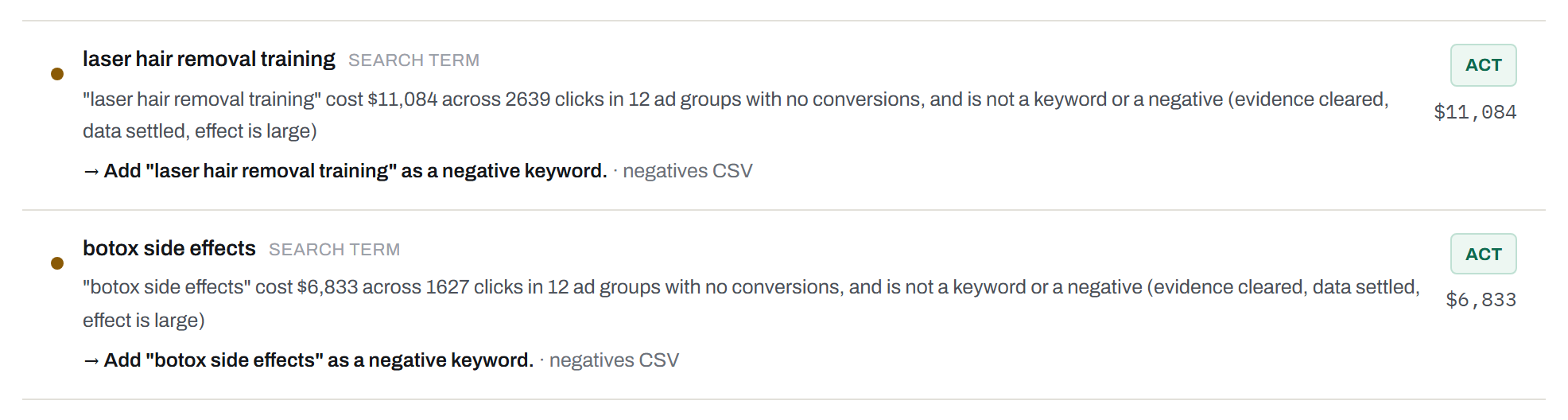
Scroll the figure sideways to read the full row.
Fig. 1Two findings from the sample account (Northbeam Clinics, fictional data). AdStrike writes each search-term finding as one sentence with the spend, the clicks and the ad groups involved, and puts the proposed change and its export file on the line below.
- aEvidence state: cleared, data settled, effect size
- bCertainty tier
- cMoney at stake, in dollars
- dDestination: the negatives CSV
Certainty tiers and the money at stake
Each finding carries a certainty tier and the dollars at stake. AdStrike ranks the queue by a score built from the tier, the dollars and the severity. On Sep 18 the sample account had 48 findings: 25 Act and 23 Watch.1
- ACT
- The finding cleared the bar on days with at least 85% of their conversions in, and the effect is large. Structure findings, such as an ad group with no ad, are Act as soon as AdStrike sees them.
- WATCH
- The finding cleared the bar. The effect is small, or its newest days have not settled.
- INSUFFICIENT EVIDENCE
- The finding sits below the bar, its baseline is too thin to judge, or its newest day holds under half the conversions it will end with. Below the bar, you see its progress, for example 62% of the bar, clears ~Oct 4.
The evidence bar and data that has not settled
A finding clears the bar when the spend behind it reaches $1,000 or its conversions reach 10. That is the default, and each account has its own bar.
Google keeps adding conversions to a day for several days after it ends. AdStrike learns from its own snapshots how long your account takes to settle, and holds a finding that rests on unsettled days at Watch or Insufficient evidence. The sample account settles after 5 days.2
AdStrike keeps every nightly snapshot. The Daily report shows each day at its latest reading and counts the snapshots that include it.
| Date | Readings | Spend | Conv. | Cost per conv. |
|---|---|---|---|---|
| Sep 17 | 1 | $2,543 | 20.2 | $126.16 |
| Sep 16 | 2 | $2,654 | 27.3 | $97.18 |
| Sep 15 | 3 | $2,619 | 32.6 | $80.39 |
| Sep 14 | 4 | $2,659 | 34.1 | $78.06 |
| Sep 13 | 5 | $1,806 | 22.6 | $79.80 |
| Sep 12 | 6 | $1,870 | 22.5 | $82.94 |
| Sep 11 | 7 | $2,602 | 33.3 | $78.23 |
| Sep 10 | 8 | $2,672 | 35.0 | $76.38 |
| Sep 9 | 9 | $2,624 | 35.4 | $74.02 |
| Sep 8 | 10 | $2,591 | 35.1 | $73.73 |
| Sep 7 | 11 | $2,612 | 32.9 | $79.47 |
| Sep 6 | 12 | $1,833 | 23.9 | $76.68 |
| Sep 5 | 13 | $1,801 | 24.4 | $73.74 |
| Sep 4 | 14 | $2,639 | 33.1 | $79.69 |
| Sep 3 | 14 | $2,611 | 33.5 | $78.04 |
Fig. 2The Daily report, Sep 3 to Sep 17, sample account. Readings counts the nightly snapshots that include the day. Sep 17 has one reading and shows $126.16 per conversion. Below the dashed line every day has 5 or more readings, and cost per conversion stays between $73.73 and $82.94.
Pools: one decision per keyword across the account
Google Ads keeps a separate copy of a keyword in each ad group that holds it. In the sample account the phrase keyword "botox cost" sits in 12 ad groups across 12 campaigns. None of the 12 clears the bar alone: the top spend is $446, and the most conversions any one has is 4.9.
AdStrike pools the copies by text and match type. Pooled, "botox cost" holds $3,919 of spend and 33.5 conversions at $117 each, which clears the bar. You give the pool your own verdict, separate from AdStrike’s tiers: scale, hold, watch or reject. The verdict covers all 12 keyword IDs, and a reject is permanent. AdStrike refuses a verdict on a pool below the bar and lists it under Gathering.3
![The Pool queue page. Header: bar set at $1,000 spend or 10 conversions, snapshot 2026-09-18. Tabs: Ready To Judge 15, Gathering 48, Rejected 0, All. Rows: "botox cost", phrase, 12 instances, $3,919, 33.5 conversions, $117, Cleared; "laser hair removal cost", $3,873; [coolsculpting], exact, $3,851, $86.46. Each row has Scale, Hold, Watch and Reject buttons.](img/pools-queue.png)
Scroll the figure sideways to read each column.
Fig. 3The pool queue, sample account. The header carries the bar and the snapshot date.
Each pool keeps an instance ledger with the campaign, ad group, spend, conversions and keyword ID of each copy. Before you decide, the ledger shows the 12 IDs your verdict will cover.
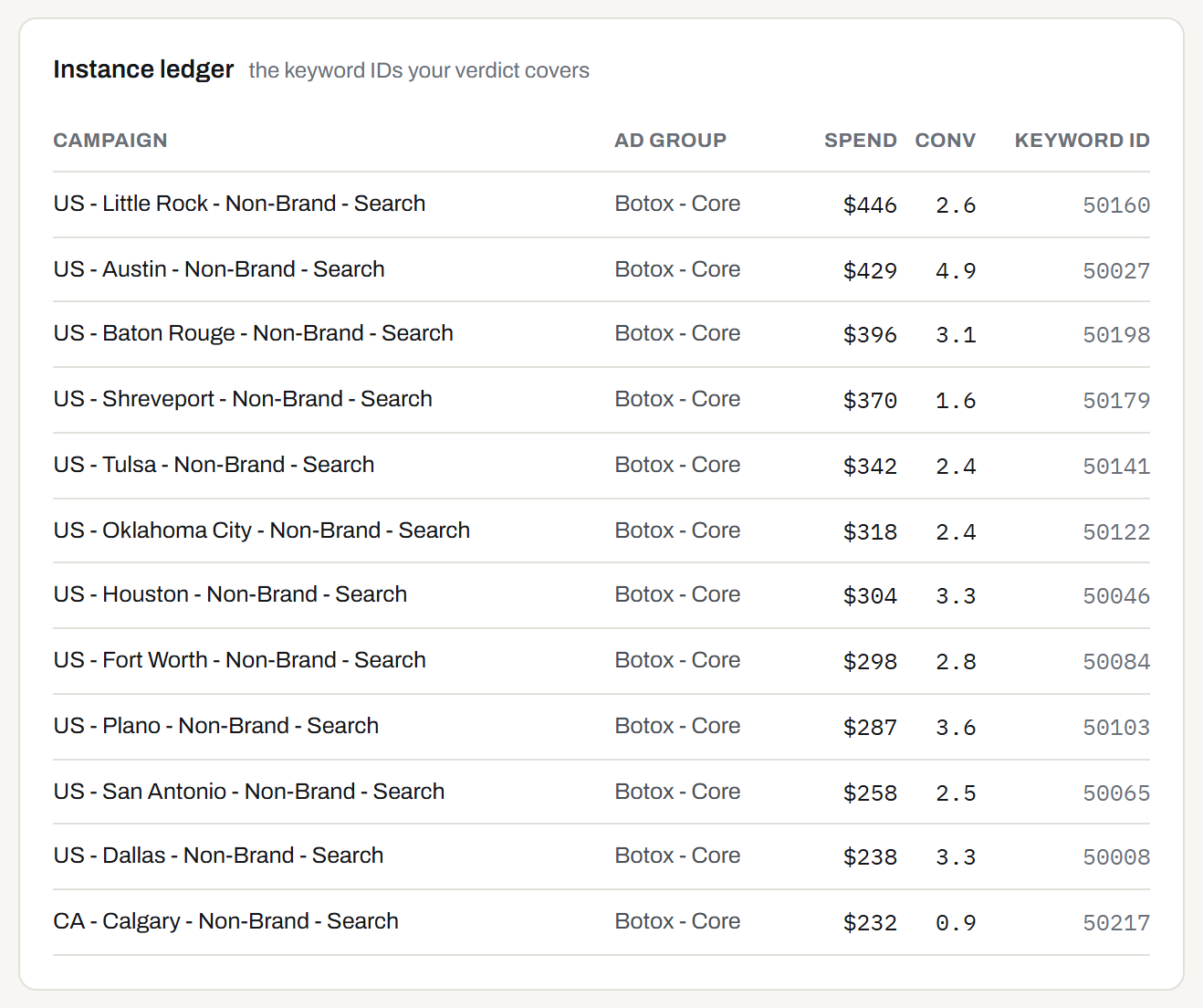
Scroll the figure sideways to read each column.
Fig. 4Instance ledger for "botox cost", sample account. Data-driven attribution reports fractional conversions such as 2.6 and 0.9.
Reports by the segments in your campaign names
If you plan by market, or by brand against non-brand, AdStrike reads those segments from your campaign names. Pick a preset or write your own convention, and AdStrike splits US - Dallas - Non-Brand - Search into country, market, type and channel. The Segments report rolls performance up by any one of those parts, as in Fig. 5, and most other reports carry them as columns.
AdStrike lists a name that breaks the convention as an exception and raises a structure finding. In the sample account it flags the campaign “Legacy Botox Test 2024.” with the reason too_few_segments: it expected at least 4 segments separated by " - " and found 1.4
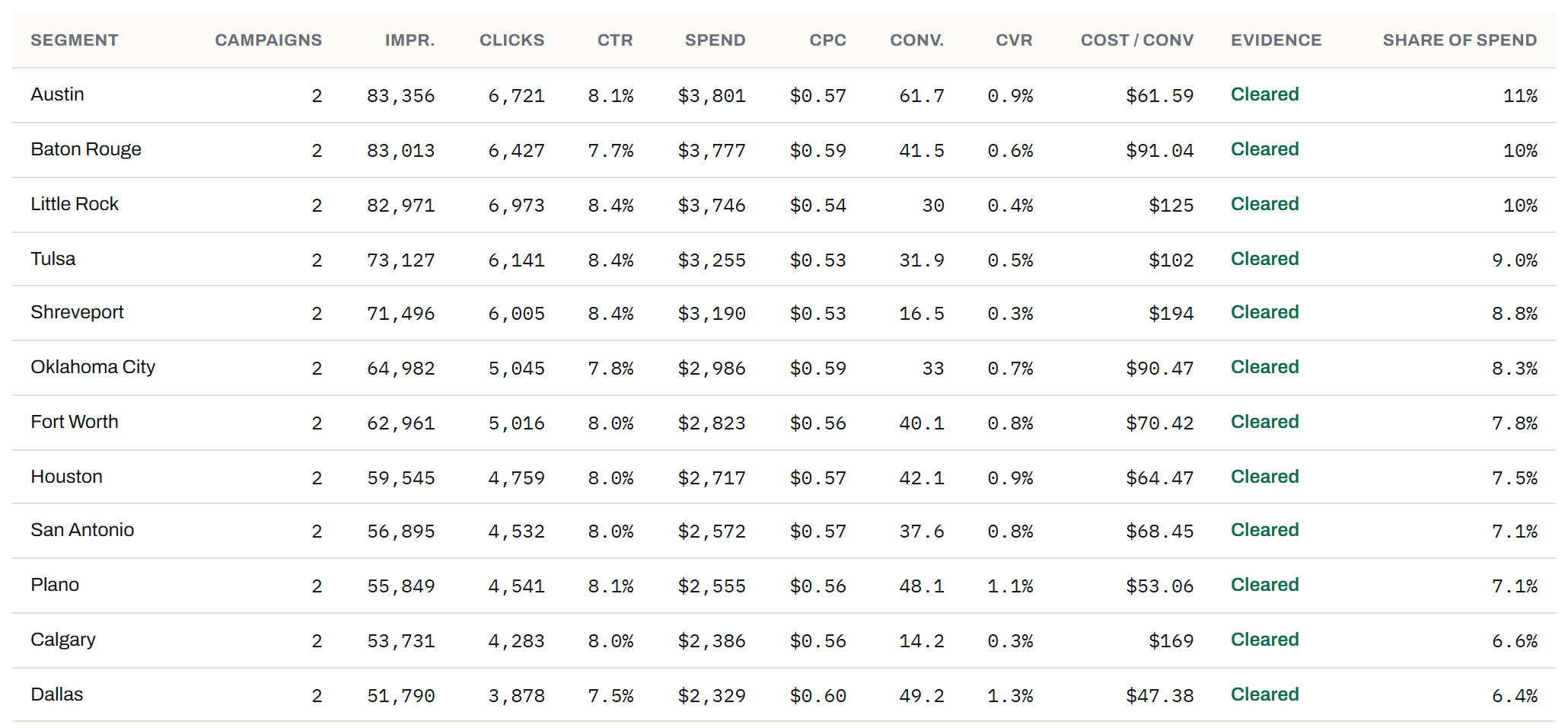
Scroll the figure sideways to read each column.
Fig. 5Segments report by market, Sep 3 to Sep 17, sample account. Cost per conversion runs from $47.38 in Dallas to $194 in Shreveport across 12 markets.
The eight checks AdStrike runs each night
| No. | Check | AdStrike flags |
|---|---|---|
| i | Budget-limited campaigns | Campaigns losing impression share to budget. |
| ii | Cost-per-conversion spread | A spread in cost per conversion of 3× or more across the campaigns that cleared the bar. The sample account runs from $22.66 in a Brand campaign to $228 in a Non-Brand one, 10.1×, against a blended $78.49. |
| iii | Cost-per-conversion shift | A campaign’s cost per conversion over the last 7 days, outside the range the 28 days before it set. |
| iv | Rank-lost impression share | A rise in Search lost IS (rank), traced to the Quality Score component rated Below average: expected CTR, ad relevance or landing page experience. |
| v | Quality Score components | A campaign where one component is rated Below average on 40% or more of its scored keywords. |
| vi | Distance rings | Outer rings that take 20% or more of a campaign’s spend at 1.8× or more the inner cost per conversion. In the sample account one campaign pays $681 per conversion beyond 20 miles, against $190 inside. |
| vii | Search terms | Search terms you pay for that bring no conversions, as negative candidates, and converting search terms you have not added as keywords. |
| viii | Structure audit | A campaign with no location target or no budget, an ad group with no RSA or no keywords, a name that breaks your convention, and a negative list with “brand” in its name attached to a Brand campaign. |
Behind the findings sit 16 Performance reports. Every report with spend except Daily shows the evidence status of each row, and each report downloads as CSV.5 Claude and other AI tools can read the same analysis through an MCP endpoint.
AdStrike makes no changes to your account
AdStrike reads your account through the Google Ads API, and its code makes no write calls. Google offers one Ads scope, so the consent screen lists edit rights all the same.
AdStrike writes Google Ads Editor files from its Act findings: negative keywords, new keywords, and budget changes when a budget finding reaches Act. In the sample account 15 of the 25 Act findings have a file. For the other 10, such as a rank loss traced to expected CTR, you make the change in Google Ads yourself.
In Editor, choose Account → Import → From file, review the rows and post them yourself. The files carry no Labels column, so your labels stay as they are.
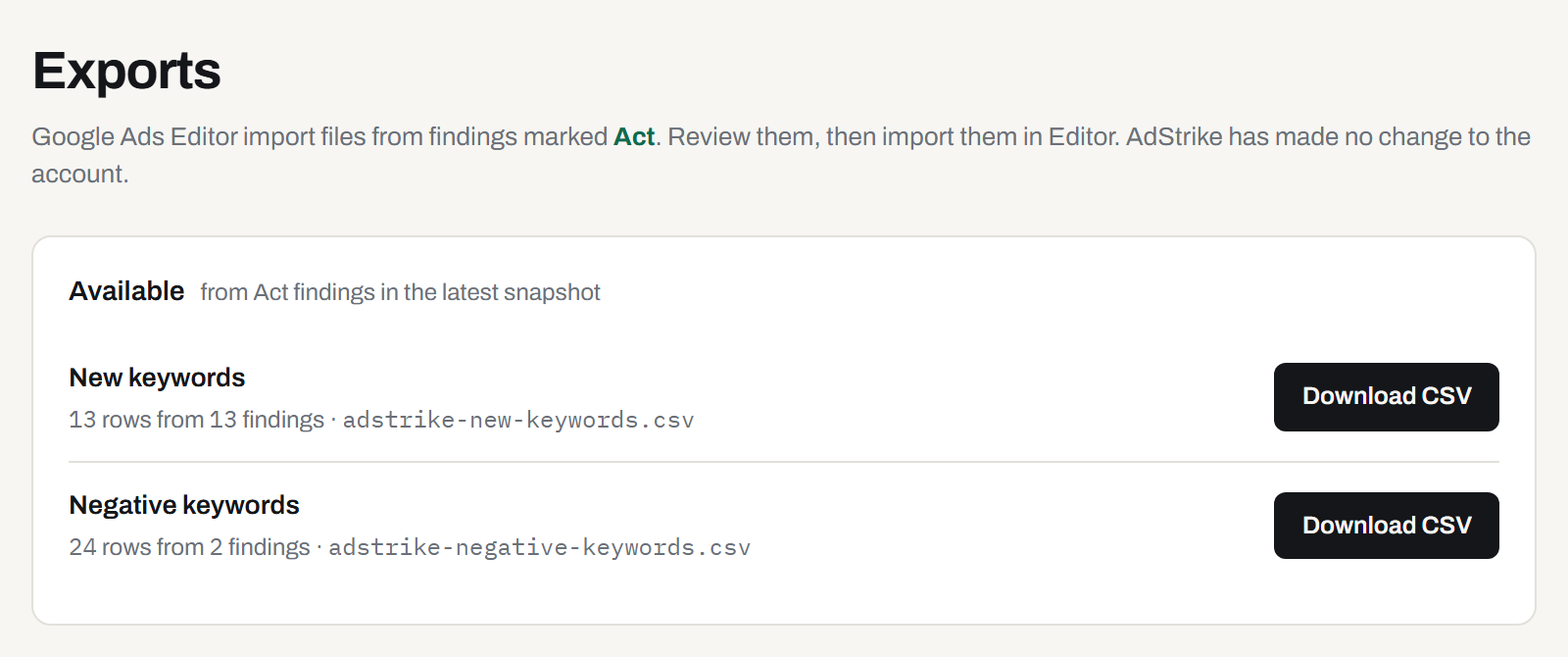
Scroll the figure sideways to read each column.
Fig. 6The Exports page, sample account. 13 new keyword rows from 13 findings and 24 negative rows from 2.
Jake Hodges ran this method by hand for six months on one account
The account had 163 locations in 3 countries and 340 campaigns, and Jake ran the method in spreadsheets. Cost per lead ran from $32 at one location to $208 at another, and he worked that spread as a queue. He ran 295 checks on the account’s radius rollout, and 294 passed. He also read a platform-wide Google bidding change and answered it within a day.
AdStrike runs the cost-per-conversion spread check and seven others on your Search campaigns each night.
Fig. 7The origin account. In panel a, the two dots mark the lowest and highest cost per lead of the 163 locations. In panel b, each square is one radius check, and the failed check sits last.
Jake Hodges, Citamark. He built AdStrike from those spreadsheets.
Access is by invitation. Write to Jake with your Google Ads account ID and your monthly Search spend.
Request accessWith an invitation, sign in at app.adstrikeai.com.